Zaplog.

Everything you need to be a superhuman.

The ultimate personal intelligence platform, everything you need, one account, built for everyone.

Get the app Log in

One account

Everything, everywhere,all at once for your benefit.

A personal intelligence platform designed to bring the fragmented parts of your digital life into one seamless, intelligent system—helping you manage information, priorities, and actions in a healthier and more intentional way.

Zappy · Your personal agent

Zappy MakesYou Happy.

Meet Zappy in your Chats. Message him naturally to get things done across Zaplog and other platforms.

  • Inside your Chats
  • Natural conversation
  • Actions across Zaplog
  • Actions across other platforms

Reminders

A little nudge.Right on time.

Ask Zappy for a reminder and get notified when it’s time—even when you’re outside the app.

  • Natural-language reminders
  • Timely notifications

Multiple contacts

One request.Reach your people.

Tell Zappy what to say and who needs to hear it. Review the messages, then confirm.

  • Multiple contacts
  • Review before sending

Groups

Keep your groupin the loop.

Ask Zappy to message your group. Check the message and confirm before it goes out.

  • Group messages
  • You approve

ZapFit

Tell Zappy.Track your day.

Log food and water through a conversation and see your updated daily totals.

  • Food logging
  • Water tracking
  • Daily totals

Memory

Rememberswhat matters.

Ask Zappy to remember an important detail and confirm what gets saved.

  • Personal details
  • Confirm what’s saved

Recorded examples from the Android app. Nothing here is connected to a live account.

The Zaplog Chats tab with Zappy at the top of the conversation list, above chats with Anthony Edward, Double G, G1 and Jessica Ed, and the Rooms, Pod, Zaplog, Fit, Cloud and More bar.A conversation with Zappy: a request to be reminded to drink water in two minutes, the reminder being set for 22:08, and the reminder arriving.A conversation with Zappy: one request to tell two contacts the sender cannot come, the wording proposed for each, and confirmation that both were sent.A conversation with Zappy: a request to message the G1 group, the message read back for confirmation, and confirmation that it was sent.A conversation with Zappy: water already logged, two boiled eggs queued for confirmation, and the day’s calorie, protein, carbohydrate, fat and water totals after confirming.A conversation with Zappy: a detail worth remembering, Zappy asking whether to save it, and confirmation that it was saved.
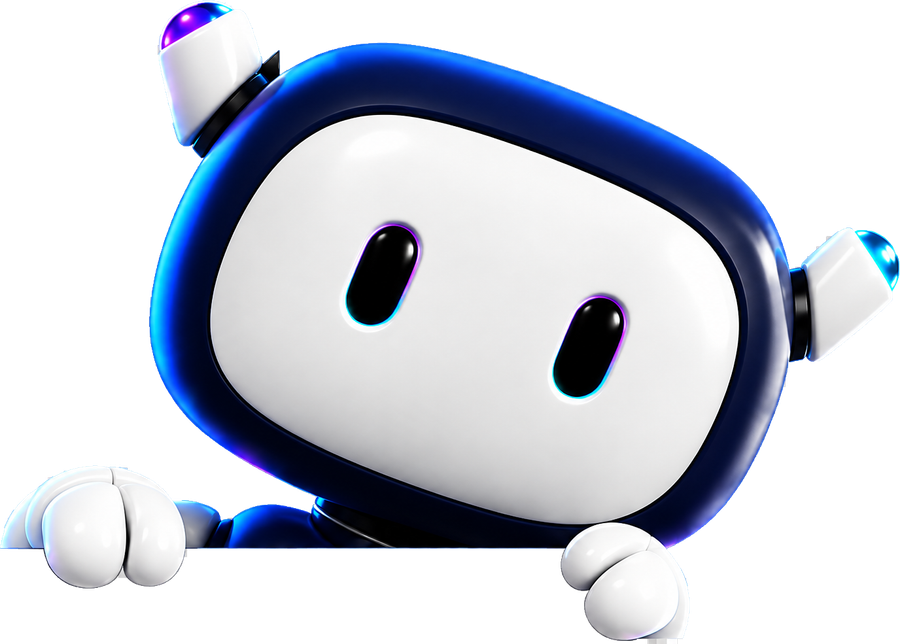
Zappy, the Zaplog agent: a small white and dark-navy robot with antenna ears, peeking over the top of the phone with both hands resting on its edge.
The Zappy row at the top of the Chats list: “No problem — scrapped those. What would you rather do with the day?”
Asked to be reminded in two minutes to drink water. Zappy proposes “Remind you ‘Drink some water’ at Mon 7 Sept at 22:08”, confirms “Done — I’ll nudge you at 22:08”, and at 22:08 says “Time to drink some water.”
A request to tell two contacts “I’m not feeling well today I’m very tired I’m busy can’t come”. Zappy proposes the wording for each, and after a yes replies “Sent to both — Tony and Double G got your message.”
A request to send “Call me bro” to the G1 group. Zappy reads it back and asks to confirm; after a yes it replies “Sent to G1 — ‘Call me bro’ is out.”
Zappy queues “two boiled eggs” for today’s meals in ZapFit and, once confirmed, returns the day so far: 155 of 2000 calories, 13g of 125g protein, 1g of 225g carbs, 11g of 67g fat and 500ml of 2,500ml water.
A request to remember a family member’s name. Zappy asks “Got it — want me to save that?”, and after a yes replies “Noted — Jessica is saved.”

Chats

Everything you saystays private in one place.

End-to-end encryption for your chats, stories and calls sits under one tab. Filter to unread, favourites or groups, and search the whole lot at once.

  • All, unread, groups
  • Read receipts
  • Search everything

Calls

Call fromthe same app

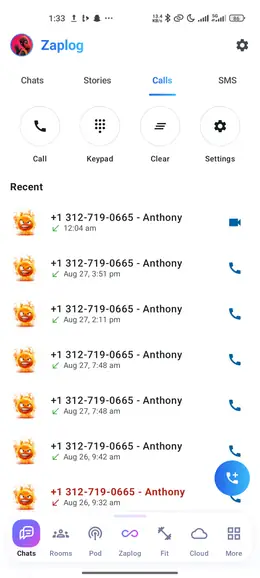
Voice and video sit next to the conversation they came out of, with a keypad and recents exactly where you expect them.

  • Voice & video
  • Keypad
  • Recents

SMS

Your texts,not a second app

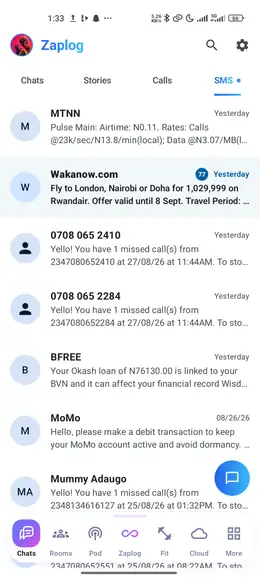
Real SMS in the same inbox as everything else, so the code you are waiting for is not two taps and an app switch away.

  • SMS inbox
  • Unread badges
  • One list

Stories

Post itfor a day

Stories from the people you already talk to, with views and replies landing back in the chat they belong to.

  • 24 hours
  • Views
  • Reply in chat
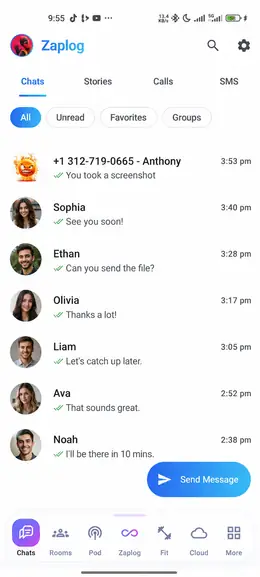
The Zaplog Chats tab: sub-tabs for Chats, Stories, Calls and SMS, filter chips for All, Unread, Zappy, Favorites and Groups, and conversations with Anthony Edward, Zappy, Double G, G1, Jessica Ed and Michael T.The Calls sub-tab, showing call, keypad, clear and settings actions above recent calls with Jessica Ed, Double G and Anthony Edward.The SMS sub-tab, showing real text messages from carriers and services in the same list style as chats.A full-screen story view with a progress bar, the poster’s name, and a view count in the corner.

Communities

Communities,right inside Zaplog

Join rooms, take a name that is yours alone, and talk to people who care about the same things you do.

  • Discover rooms
  • Your own identity
  • Create your own

Rooms

Channels forevery subject

Each room is sorted into categories of text and voice channels, so a conversation always has somewhere to live — and unread and mention badges tell you where to look.

  • Text channels
  • Voice channels
  • Mention badges

Posts

Post it, vote it,argue about it

Text, links, photos, video, polls and AMAs. Tag a post with a flair, vote the good ones up, hand out awards, and take it apart in the comments.

  • Polls & AMAs
  • Photos & video
  • Awards & flairs

Live

Talk inreal time

Chat that arrives as it is typed — reactions, replies, pins, GIFs, stickers and voice notes. Drop into a voice channel, or slide into a direct message.

  • Voice channels
  • GIFs & stickers
  • Direct messages

Yours to run

Your room,your rules

Start a room and you set it up: roles and permissions, invite links, moderation filters that run while you sleep — and notifications tuned per room, so only what matters reaches you.

  • Roles & permissions
  • Auto-moderation
  • Per-room alerts
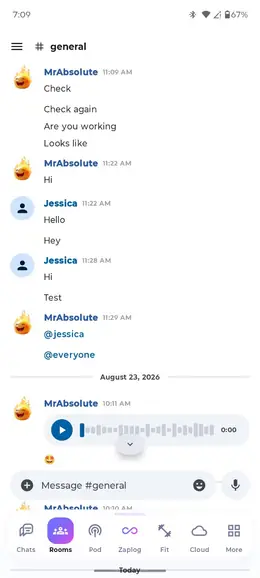
The ZapRooms welcome screen with a glowing rooms icon and options to discover rooms, pick your own identity, or create your own room.A room’s channel list: text channels named general and announcements with an unread badge, and a voice channel called The Lounge with three avatars in voice.A room post with an AMA flair running a poll between Friday at 68 percent and Sunday at 32 percent, with upvote, comment and award counts.The #general channel of a room: a voice note, a sticker from MrAbsolute, “Hello everyone” from KingEd and “Hi, everyone”, above a Message #general composer.Room settings showing roles and permissions, auto-moderation and notification toggles, plus a shareable invite link.

Podcasts

A playerinside the app

Find a show, follow it, and it keeps up with you — playing on while you use the rest of Zaplog.

  • Search shows & episodes
  • Follow what you like
  • Plays in the background

Discover

Find yournext show

Search by name, or browse what is big and what has just launched — sorted into categories and networks, from true crime to technology.

  • Search & recent searches
  • Top and just launched
  • Categories & networks

Follow

One feed,your shows

Follow a show and its new episodes land in one feed, with what you started waiting under Continue listening and what you finished marked played.

  • Latest from your shows
  • Continue listening
  • Played, remembered

Player

Built forlong listens

Skip back ten or forward thirty, set the speed once and keep it, line the next episodes up in a queue, and let the sleep timer stop at the end of this one.

  • Playback speed
  • Queue up next
  • Sleep timer

Yours

Offline,and in sync

Download episodes to listen with no signal, save the ones worth keeping, and find the same library — shows, saves and places — on every device you sign in on.

  • Download for offline
  • Save episodes
  • Synced to your account
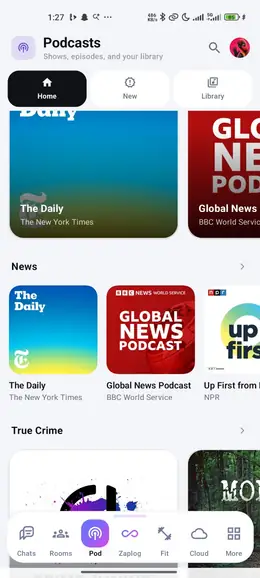
The ZapPodcasts welcome screen with a glowing podcast icon and options to search shows and episodes, follow what you like, and play in the background.The Podcasts home screen with Home, New and Category tabs, Top Shows led by The Daily and Global News, and a News row with The Daily, Global News Podcast and Up First.A following feed showing Cold Cases and Signal marked Following, with the latest episode part-played underneath.The podcast player: a scrub bar at 24 minutes 18, back ten and forward thirty controls, 1.2x speed, a sleep timer set to end of episode, and three queued.Downloaded episodes listed as available with no signal, one still downloading, and a note that saves sync to every device.

Fit

A plan fromyour numbers

Food, movement and progress in one place — built around a plan worked out from your own numbers, not a generic target.

  • A plan from your numbers
  • Log a meal in seconds
  • Progress you can see

Today

Your whole day,one screen

Calories left, protein, carbs and fat, water, and the activity your phone already tracks — with quick log buttons sitting under all of it.

  • Calories & macros
  • Water & fasting
  • Health Connect activity

Scan

Point it atyour plate

A photo of the meal, a nutrition label, or a barcode — ZapFit works out the numbers, shows you what it found, and lets you correct it in your own words.

  • Meal photos
  • Barcodes & labels
  • Review before it logs

Food

A library thatlearns your food

Search foods and brands, and everything you log builds your own shelves — recent, frequent, favourites, custom foods and recipes, ready to log again.

  • Search foods & brands
  • Custom foods & recipes
  • Recent & favourites

Progress

Proof it isworking

Weigh-ins become a trend line rather than noise, with a weekly rate, body measurements and your calories over time — all drawn from what you logged.

  • Weight trend & rate
  • Body measurements
  • Reminders that nudge
The ZapFit welcome screen with a calorie ring reading 1,540 kcal left, ringed by activity, water and food icons.Today in ZapFit: 590 kcal left against a 2,100 target, protein, carbs and fat bars, 1.4 litres of water and 7,420 steps.The meal scanner: a crosshair over a photographed plate, with grilled chicken and jasmine rice detected and a plain-language correction reading “the rice was more like two cups”.The ZapFit food library on its History tab: a breakfast of two boiled eggs at 155 kcal and a lunch of beans and plantain at 385 kcal, each with Relog and Save as recipe.A weight trend chart falling toward a 74 kilogram goal, with the current weight at 78.4 kilograms and a rate of minus 0.4 kilograms a week.

Cloud

Files in thesame app as chats

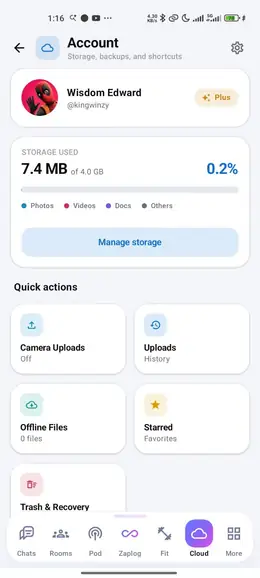
Your files, photos and backups live where your conversations do — uploaded once and reachable from anywhere you sign in.

  • Files & folders
  • Camera backup
  • Offline access

Files

Everything,filed

Send up documents, photos, whole folders or a page you scan on the spot — then move, copy, rename and star them into an order that makes sense to you.

  • Upload anything
  • Scan documents
  • Move, copy, organise

Photos

Your camera roll,backed up

Turn on camera uploads and the albums you choose copy themselves up in the background — on Wi-Fi unless you say otherwise, videos included if you want.

  • Albums you pick
  • Wi-Fi by default
  • Videos & Live Photos

Find it

Search it,or take it

Search by name, kind or date. Star what you reach for often, and mark anything available offline so it opens with no signal at all.

  • Search & filters
  • Starred shortcuts
  • Available offline

Safe

Nothing lostby accident

See exactly what is using your space, watch every upload finish, and know that anything deleted waits in Trash for 30 days before it goes for good.

  • Storage at a glance
  • Trash keeps 30 days
  • Upload history
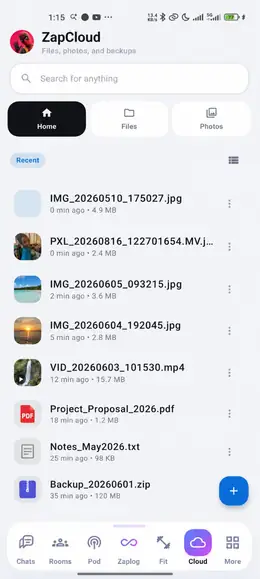
The ZapCloud welcome screen with a glowing cloud icon ringed by document, folder, video and photo marks.A ZapCloud documents folder listing Receipts with fourteen items, a starred lease agreement PDF, and a video called Trip to the coast.Camera uploads in progress over Wi-Fi, backing up 212 of 340 photos with a grid of album thumbnails ticked off.A search for “lease” filtered to PDFs, returning the starred lease agreement marked as on this phone and opening with no signal.The Cloud Account screen: 597 MB of 2 TB used, broken down by Chats, Stories, Stickers and more, a Manage storage button, and quick actions for camera uploads, upload history, offline files and starred.

Organized

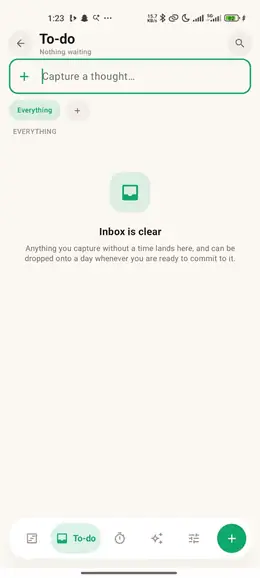
A day youcan see

Every task carries a time and a length, and the day is drawn to scale — so you can see it before you live it.

  • A day you can see
  • Capture now, decide later
  • Replan without guilt

Today

Drawn atits real length

Up next, what is left, and the hours at the size they actually take — with a now-line showing exactly where in them you are.

  • Blocks to scale
  • Up next
  • Energy today

Timeline

Day, week,month

The same plan at three zooms, with your phone’s calendar drawn alongside it and a now-line showing where in the day you actually are.

  • Three views, one plan
  • Your calendar alongside
  • Routines that repeat

Plan

Say it, andit is scheduled

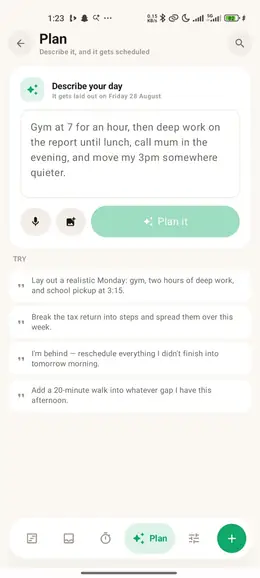
Describe the day out loud or in writing — even hand it a photo — and the planner proposes the blocks. Nothing lands on your day until you accept it.

  • Speak or type it
  • Proposals, not surprises
  • Add a photo

Focus

One blockat a time

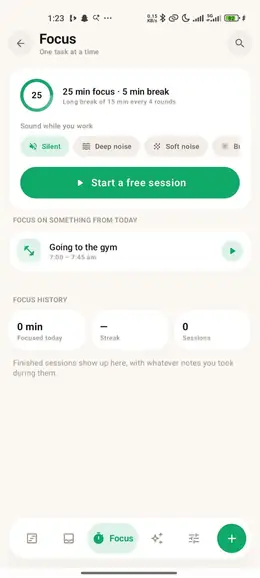
Start a block and the timer runs it in rounds, with a break at the end of each. Sound while you work, a place for what pops into your head, and a streak to keep.

  • Focus rounds & breaks
  • Sound while you work
  • Streak & history

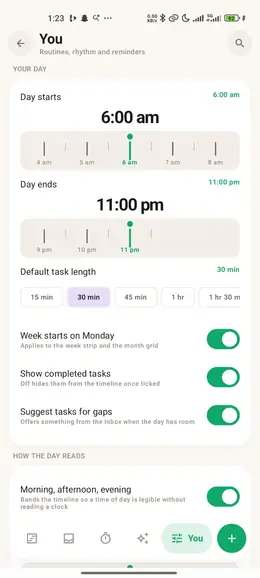
Rhythm

A plan thatkeeps up

Effort is budgeted as well as time, a morning look-ahead and an evening replan arrive on their own, and the day sits on your home screen without opening the app.

  • Energy budget
  • Morning & replan nudges
  • Home-screen widget
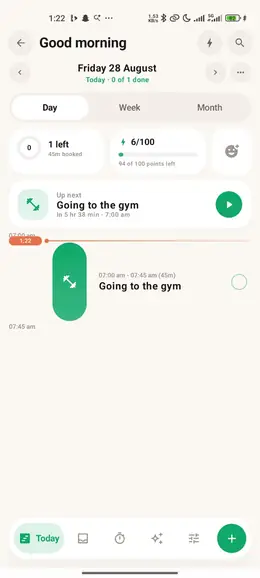
The Organized welcome screen showing today as four blocks over three hours fifteen: arise and shine, deep work, a run, and wind down.The Today view: one left and 45 minutes booked, an energy score of 6 out of 100, an up-next card for the gym, and a timeline with the now-line at 1:22.The week view: seven columns of pastel blocks with the phone’s own calendar drawn alongside, and Day, Week and Month tabs above.A spoken plan — “gym at seven, then two hours on the deck” — turned into two proposed blocks with Discard and Apply buttons.A focus session at nine minutes thirty-two, round two of four on deep work, with rain sound, a twelve-day streak and two hours forty today.Energy today at 68 of 100, with a morning planning nudge at 7:30, a replan nudge at 20:00, and a home-screen widget row.

Under More

Two morethat just work

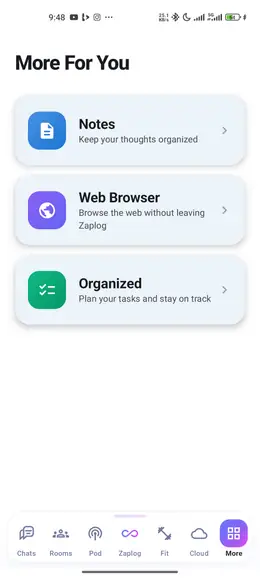
Not everything needs a pitch. These are here, they are yours, and they open in the same session as the rest.

Notes

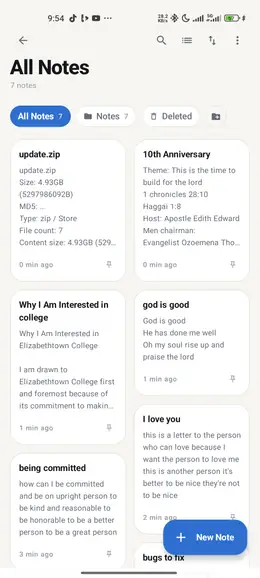
Folders, pinning, search and sort, a card grid you can scan, and a deleted bin for when you change your mind.

The All Notes screen: a card grid of seven notes with pins, and tabs for All Notes, Notes and Deleted.

Web Browser

Open a link and it opens here. Same app, same account, same session you were already in.

The in-app web browser with a tab open on zaplog.ai, showing the neon infinity loop of the current holding page.

Discover

Stories worthyour time

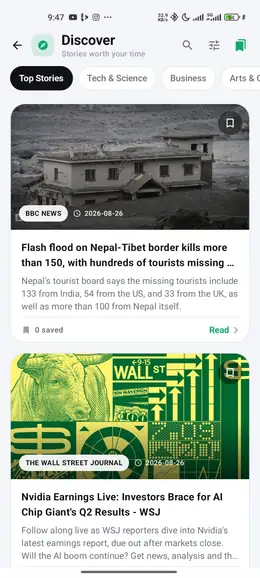
Top stories, tech and science, business, arts and culture — every card carrying its source and date, saved for later in a tap, and a reader view when you want the words without the page.

  • Four sections
  • Save for later
  • Reader view
The Discover reader with Top Stories, Tech & Science, Business and Arts tabs above news cards carrying their source and date.

Zaplog

The centre of the loop

The assistant sits in the middle of the bottom bar because it sits in the middle of everything else. It has context on the tabs either side of it — which is the whole reason these ship as one app.

Ask Zaplog…

Zaplog
  • #general Rooms
  • chicken and rice Fit
  • Signal, tonight Pod
  • lease.pdf Cloud
  • deep work block Organized

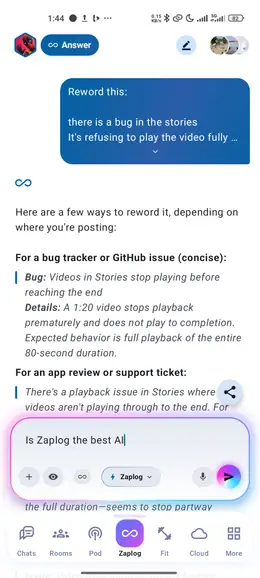
Zaplog Pro answering “How can I turn a big goal into a plan I can actually follow?” with a step-by-step plan, above the Ask Zaplog composer and its Zaplog Pro model chip. The Zaplog tab at rest with Zaplog Pro selected: the Zaplog Pro wordmark above an empty Ask Zaplog composer with attach, vision, model picker, microphone and voice controls.

Privacy & Security

Your world stays yours.

Your conversations, files, fitness data, ideas, and daily activities are deeply personal. Zaplog is designed to keep them protected, private, and under your control—so you can use everything in one place with confidence.

  • Private by default

    Privacy is built into the Zaplog experience from the beginning, helping protect your personal information across the platform.

  • Protected information

    Zaplog uses modern security safeguards to help protect your information while you use the app and when it is stored.

  • You control access

    You decide what you share, which permissions you enable, and how connected features interact with your information.

  • Secure account protection

    Protective systems help prevent unauthorized access and keep your Zaplog account safer.

  • Only what is needed

    Zaplog limits the information used to what is necessary for the features and services you choose.

  • Security that keeps improving

    Protection is continuously reviewed and strengthened as Zaplog grows, new features arrive, and security standards evolve.

No seams

one account

Your podcast keeps playing while you argue in a room, log your lunch, and move your deep work block to after the gym. Ten stops on one loop, and no exit.

Get the app

The countdown is on

Your superhuman era starts in

Zaplog launches on September 25, 2026 at 10:00 AM Chicago time.